Verify the image
that actually lands.
The MarkMyAI Chrome extension is the browser layer for real publishing workflows. It checks live web images after CMS, resize, and CDN — and shows whether provenance is complete, recoverable, or missing.

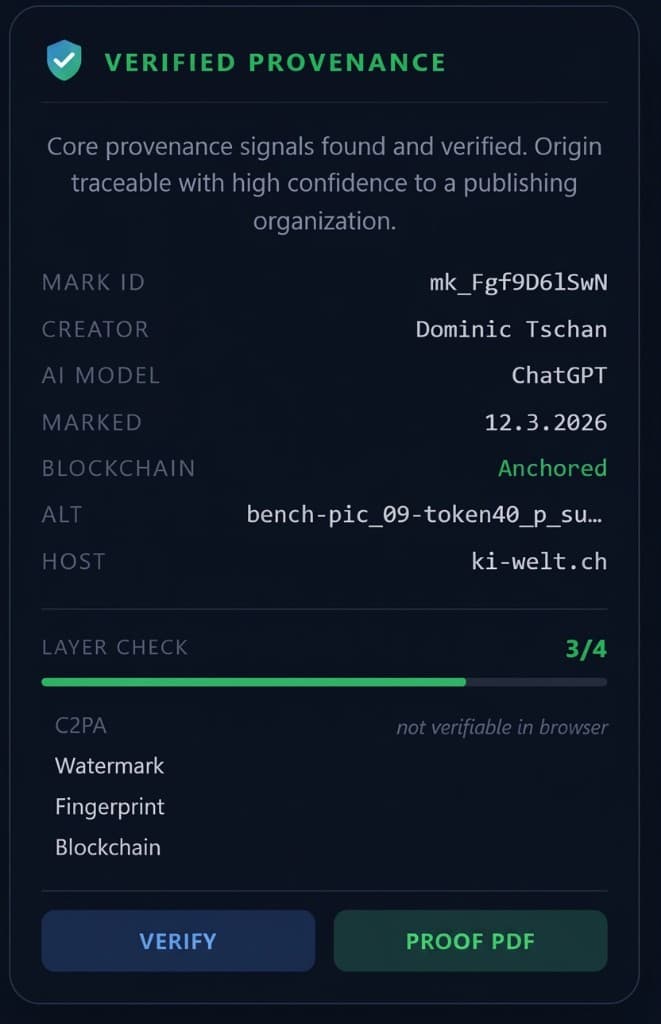
Hover over any image on any website. The extension checks all four MarkMyAI layers and shows Mark ID, creator, AI model, blockchain status, and direct links to Verify and Proof PDF.
In the browser, provenance becomes visible to everyone.
Creation-time metadata isn't enough once images pass through real publishing pipelines. The Chrome extension turns MarkMyAI into a reader-facing verification experience for the final delivered image — not just the original file.
Three quick steps on any webpage
Get a fast first answer — with a deeper recovery path when the publishing pipeline has already transformed the image.
Hover over any image
A small MarkMyAI badge appears on the delivered image — readers or editors can check provenance without leaving the page.
Open the quick result
The extension shows whether the image has verified public proof, a recovered MarkMyAI signal, or no supported signal.
Go deeper when needed
Open Verify, download the Proof PDF, or start the full watermark recovery path for tougher publishing-pipeline cases.
Built for verification in the real world
The extension is more than a badge — it is the browser-side proof product for publishers who need to verify images after real delivery transformations.
Verify images as actually delivered
Check the exact image readers see after CMS, theme, and CDN transformations — not just the publisher's original file.
Verified, restored, or no signal
The extension distinguishes full public proof, recoverable MarkMyAI signals, and images with no supported provenance signal.
Deep watermark recovery
Trigger a second watermark check directly from the tooltip when the quick fingerprint check isn't enough.
Batch scan per page
Scan up to 20 images on the current page and get a compact overview of verified, restored, and missing signals.
Publisher-friendly presentation
The UI avoids alarming language and explains what was actually found — verification becomes useful rather than adversarial.
Works with the WordPress plugin
When a publisher exposes MarkMyAI data in the DOM, the extension picks it up instantly without an extra API call.
Perfect paired with the WordPress plugin
Publishers mark originals in WordPress, expose proof references in the frontend, and let readers verify those images directly in the browser. Provenance moves from a backend process to something visible and usable on the live page.
Give readers a proof experience, not a technical data dump
The scan result explains what was found, shows the Mark ID, creator, blockchain status, and links directly to Verify and the Proof PDF. Provenance becomes readable for people — not just machines.
Open the Verify pageProvenance verification, right in the browser.
Use MarkMyAI to verify images on live websites, inspect proof details, and restore trust — even after real publishing transformations.